


Pandas is one of the most widely-used libraries in the data science ecosystem. It provides numerous functions and methods for efficient data analysis and manipulation.
Reading the entire documentation and trying to learn about all the functions and methods at once is not a smart way for mastering Pandas. Instead, it is much more efficient to learn by solving tasks and problems.
In this article, we will solve 3 tasks that involve manipulating a data frame. The methods used for solving these tasks will be helpful for some other tasks as well.
We will make use of a NumPy function so let’s start with importing both libraries.
import numpy as np
import pandas as pd
Stacking data frames
Consider we have the following data frames.
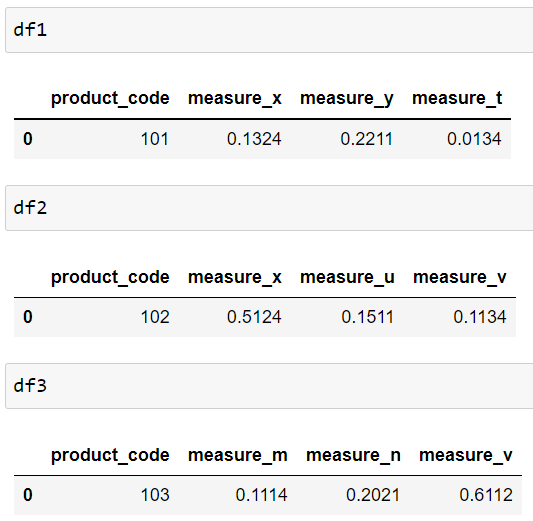
We need to combine them into a single data frame. One method is to use the concat function of Pandas. However, it will create a separate column for each column name in both data frames.
pd.concat([df1, df2, df3])

If we combine several data frames with this method, we will end up having a data frame with too many columns. What we want instead is as follows:

We can create this by using the vstack function of NumPy. The following code snippet produces the above data frame.
pd.DataFrame(np.vstack([
    df1.columns, df1,
    df2.columns, df2,
    df3.columns, df3]))
We can also assign column names with the columns parameter.
df = pd.DataFrame(
    np.vstack([df1.columns, df1,
               df2.columns, df2,
               df3.columns, df3]),
    columns = ["product_code","msr1","msr2","msr3"]
)df

Select every other row
Let’s take a look at the data frame we have just created. The first, third, and fifth row does not contain a numeric value. They indicate the kind of measurements.
For some reason, we want to only select the rows that contain numerical values. Thus, starting from the second one, we need every other row.
The iloc method of Pandas is quite flexible in terms of how to select rows and columns from a data frame. We can specify the starting and ending index along with a step size.
df.iloc[1::2]

The first and second numbers are the starting and ending indices, respectively. Since we want to go all the way down to the last row, we do not have to specify the ending index so it is left blank. The last number is the step size. If we need to select every third row, the step size becomes 3, and so on.
The iloc method also allows for selecting columns using the column indices.
df.iloc[1::2, :3]

The numbers after the comma specify which columns to select. The “:3” expression means select up to the third column starting from the beginning. We also did not indicate a step size so the default value is used which is one.
Create a new column at a specific location
It is a common operation to add new columns to a data frame. Pandas makes it very simple to create new columns.
One method is to write a column name and assign a constant value. Let’s add a date column to our data frame.
df["date"] = "2021-10-05"df

By default, the new columns are added at the end. If we want to add a new column at a specific column index, we should use the insert function.
The following code snippet creates a new date column at the beginning of the data frame.
df.insert(0, "new_date", "2021-10-05")df

The first parameter is the index for the new column. The second one is the column name and the last parameter defines the column values.
Conclusion
When it comes to working with tabular data, it is highly likely that Pandas has a solution for your task or problem. As you practice and solve problems with Pandas, you will discover the great features of this amazing library.
The best method for learning Pandas, as with any other software tool, is practicing. Reading the entire documentation without any exercise can get you only to a certain level. You should support it with lots of practice.
Thank you for reading. Please let me know if you have any feedback.


